
Free TikTok Caption Generator
This TikTok caption generator turns a few notes into a caption that adds context to your video, sounds like a person, and uses a few hashtags that actually fit.
Say what your video is about, pick a style, and see your caption on a real looking TikTok before you copy it.
Free to use, no signup required. Fair use limits apply.
Your result shows up here
Your result shows up here. You get one tailored result, then you can regenerate it for a fresh take or ask for a change.
How it works
How to use the TikTok caption generator
Three steps, about thirty seconds. The video preview updates while you go.
- Step 1
Say what your video is about
Pick video or photo carousel, then describe it in a few words. Add the real details if you have them.
- Step 2
Choose your style
Pick a tone and a goal, then set the length, the emoji and how many hashtags you want.
- Step 3
Tweak and copy
See your caption on a TikTok preview, ask for a fresh take or a small change, remove any hashtag, then copy and paste it into your post.

Real examples
6 TikTok captions worth learning from
How well known accounts caption their videos, from a three word pun to real context.
- Ryanair@ryanairMinimal
act your fare 👍 #ryanair
24 / 2,200Why it worksA three word pun on "act your age" and one branded hashtag. On TikTok the video does the work, so the caption just adds the joke.
View video for Ryanair (opens in a new tab) - Chipotle@chipotlePersonality
costume loading🔮 what’s urs?
28 / 2,200Why it worksLowercase, texting spelling and a question anyone can answer in two words. It reads like a friend, which is the point.
View video for Chipotle (opens in a new tab) - Sephora@sephoraAction-focused
Shop the sweetest @Gisou Lip Therapy Duo on the drop shop NOW. 🍯
64 / 2,200Why it worksLeads with the action, names the product and tags the brand, so people know exactly what to do next.
View video for Sephora (opens in a new tab) - The Washington Post@washingtonpostBrand-focused
A bear sneakily wandered through a library in Mammoth Lakes, California. Human-bear encounters are on the rise this year in at least 15 states. Across the country, agencies received more bear-related calls than last year.
221 / 2,200Why it worksThe video shows the bear. The caption adds what it can't: where it happened and why it matters.
View video for The Washington Post (opens in a new tab) - Gymshark@gymsharkPersonality
it’s time to lock in. #winterarc #greatlockin #mindset #mentality #Gymshark @sara
81 / 2,200Why it worksOne short line that rides a trend, then trend, topic and brand hashtags plus a creator tag.
View video for Gymshark (opens in a new tab)  Nike@nikeBrand-focused
This is After Dark Tour Mexico City. 21.1 kilometers. A sisterhood of 10,000 runners. One unforgettable night. Esto es After Dark Tour Ciudad de México. 21.1 kilómetros. Una hermandad de 10,000 corredoras. Una noche inolvidable. #afterdarktour #fyp
248 / 2,200Why it worksShort, dramatic sentences with real numbers, in English and Spanish. One habit to skip: TikTok says #fyp doesn't boost reach.
View video for Nike (opens in a new tab)
Captions as posted on each official TikTok account, checked on October 18, 2026. Big brands can lean on name recognition, so copy the habits, not the length. Logos are trademarks of their owners, shown only to identify each account.
Caption breakdown
What makes a good TikTok caption
On TikTok the video is the star. A good caption adds a voice or a bit of context, then gets out of the way. Here's a real one.
It sounds like her
Four lowercase words, the way she'd say it out loud. A self aware joke about doing the trend anyway makes people smile before the video even loops.
What's missing
No context, no hashtags, no question. She doesn't need them. A smaller account usually does: add what the video is about and two or three hashtags that fit.
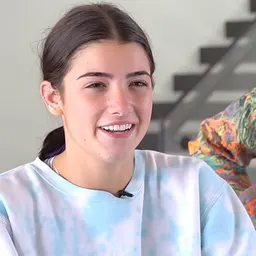
this trend is stupid
Before and after
Fixing a weak TikTok caption
Most weak TikTok captions are a row of #fyp tags. TikTok says those work like any other hashtag, so spend the space on context.
Before
new video!! 🔥🔥 #fyp #foryou #viral #trending
44 / 2,200
After
Tested three viral pasta recipes. The $5 one won, in 15 minutes 🍝 Which one should I try next? #cheaprecipes #pastarecipe #studentmeals
135 / 2,200
- "New video" became what's actually in it, with the price and the time.
- A question gives people an easy reason to comment.
- Generic tags became ones people interested in the video would follow.
Caption ideas
TikTok caption ideas for every kind of video
Six different approaches for six kinds of videos. Find one that fits, then send its settings straight to the generator.
- One liner
For jokes and videos that speak for themselves.
the oven won. round two tomorrow 🥐
34 / 2,200Why it worksA tiny story in five words that makes you want to watch.
- Question
For videos where you want comments.
be honest, would you eat this for $5? 🍝
39 / 2,200Why it worksAn easy question with a real detail in it.
- Context
For news, explainers and how tos.
Dead bugs, 3 sets of 10, five minutes. Your core will feel this tomorrow.
73 / 2,200Why it worksThe exact numbers the video moves past too fast to remember.
- Story
For behind the scenes and day in the life videos.
six tries to centre the clay. bowl number six survived, mostly.
63 / 2,200Why it worksOpens mid moment, so people watch to see how it ends.
- Product drop
For shops launching something.
Sage green is here. Same felt desk mat, new colour. Link in bio to shop.
72 / 2,200Why it worksThe news, what it is, and where to buy.
- Photo carousel
For photo posts with steps or picks.
5 desk upgrades under $30. number 3 changed everything ✨
56 / 2,200Why it worksA list promise and a teaser for one slide, so people swipe.
Best practices
TikTok caption best practices
Six habits that make the biggest difference, each one a different idea.
Add what the video can't say
TikTok's own tips say to use the caption for context. The price, the place, the reason, the result.
DoThe $5 one won, in 15 minutes
Skipnew video!! 🔥🔥
Write like you talk
TikTok captions read best in a spoken voice. Lowercase is fine. Corporate isn't.
Dobe honest, would you eat this?
SkipWe are excited to share our new recipe.
Skip #fyp
TikTok says #FYP and #ForYou work like any other hashtag, so they won't get you onto the For You feed. Use tags that describe the video.
Do#cheaprecipes #studentmeals
Skip#fyp #foryou #viral
Use a few relevant hashtags
TikTok says more hashtags won't guarantee more reach. Two to five that fit the video is plenty.
Do#pastarecipe #budgetcooking
Give people a reason to comment
An easy question or a choice between two things gets more replies than "thoughts?".
Dowhich one should I try next?
Skipthoughts?
Keep it short
TikTok's posting API allows up to 2,200 characters for a video caption, but most good ones are a sentence or two.
FAQ
Frequently asked questions
Is this TikTok caption generator free?
Yes. Free to use. Fair use limits apply.
How long can a TikTok caption be?
TikTok's posting API allows up to 2,200 characters for a video caption, and the tool stays well under that. In practice, most good captions are a sentence or two.
How many hashtags should I use on TikTok?
A few that describe the video. TikTok says more hashtags won't guarantee more reach. The tool suggests 3 or 5 and lets you remove any before copying.
Do #fyp and #foryou help?
No. TikTok's own creator tips say they work like any other hashtag and won't improve your chances of reaching the For You feed.
Do captions affect what TikTok recommends?
TikTok says video information, including captions, sounds and hashtags, is one of the things its recommendations look at. So a clear caption that describes the video helps.
Does the tool watch my video?
No. It only uses what you type, so describe the video and check the caption matches it.
Will it make things up?
No. It only uses your details. If a stronger caption needs a number or a fact, it tells you what to add instead of inventing one.
Can it rewrite a caption I already have?
Yes. Switch to "Improve my caption", paste it in, and get a stronger version that keeps your facts.
Can it write TikTok captions in other languages?
Yes. Open "More ways to personalize", pick your language, and your caption comes out in it.




A better caption is a start. Let's fix the rest of your social presence.
I help SaaS and service businesses turn content, profiles and organic social into real growth.
Explore social media marketing